Revolutionizing Hiring Processes with Microsoft Office Proficiency Test
Key Takeaways
Microsoft Office skills remain among the most in-demand competencies across administrative, operational, finance, HR, marketing, and management roles, making structured assessment critical for hiring and employee development.
Employers rely on Microsoft Office skill assessments to evaluate proficiency in Excel, Word, PowerPoint, Outlook, and Access, ensuring employees can perform tasks efficiently and maintain consistent output quality.
Commonly tested Microsoft Office skills include spreadsheet analysis, document formatting, email management, presentation design, data visualization, and advanced Excel functions such as lookups and pivot tables.
Skillrobo provides a comprehensive and automated way to evaluate Microsoft Office proficiency with task-based assessments, real-time scoring, and customizable test formats aligned to job-specific requirements.
Incorporating Microsoft Office assessments into recruitment improves hiring accuracy, reduces onboarding time, and helps organizations identify training needs for continuous workforce improvement.
Introduction
Proficiency in Microsoft Office is a valuable skill that can enhance one’s career prospects. Many employers now require job applicants to demonstrate their proficiency in Microsoft Office applications such as Word, Excel, and PowerPoint. To assess candidates’ skills, employers often use Microsoft Office proficiency tests. These tests measure an individual’s knowledge and abilities in using the various features and functions of Microsoft Office.
For employers, having employees that are proficient with Microsoft Office may be a plus. Frequently, employers may demand particular proficiency with Excel or PowerPoint, particularly for positions requiring the sorting, analysis, and display of data or the creation and delivery of presentations. In this article, we will explore the different types of Microsoft Office proficiency tests, the importance of these tests for employers, and how to improve Microsoft Office skills.
Understanding the Microsoft Office Assessment Test
The Microsoft Office skills test is a comprehensive evaluation of an individual’s proficiency in Microsoft Office applications. This test typically includes sections on Word, Excel, PowerPoint, and sometimes Outlook. It assesses various skills, such as creating and formatting documents, managing data in spreadsheets, creating presentations, and managing emails and calendars.
Basic spreadsheet operations to complicated data analysis including formulae, functions, and charts are frequently covered in Excel examinations. You can be evaluated on designing slideshows with PowerPoint, which includes adding and modifying graphic components, utilizing animations and transitions, and formatting text and slides. The Outlook test can encompass scheduling work, setting up meetings, and handling emails.
The test may consist of multiple-choice questions, practical exercises, or both. The results of the assessment test provide employers with an understanding of an individual’s proficiency level in Microsoft Office and help them gauge their suitability for the job role.
What Are Microsoft Office Skills?
Microsoft Office skills refer to the competency and expertise in using the various products of the Microsoft Office suite. Even though MS Office is made up of a wide range of other programs, Employers Particularly consider your proficiency with some of the most widely used programs, such as MS Excel, MS PowerPoint, and MS Word. Maintaining your expertise in the other Microsoft programs can still be a smart move.
What Kind Of Roles Requires Microsoft Office Testing?
Microsoft Office testing may be important for several positions in a variety of industries to make sure applicants have the knowledge and abilities to utilize this software suite efficiently. Here are a few examples,
1. Administrative Assistants/Executive Assistants:
These roles often require a strong proficiency in Microsoft Office, as tasks often involve word processing, email management, scheduling, and data management, which necessitates the use of Microsoft Word, Outlook, Excel, and occasionally Access.
2. Data Analysts:
These specialists must be proficient in handling, analyzing, and visualizing data using Excel (or comparable technologies). If managing databases is part of their job, they might also utilize Access.
3. Accountants and Financial Analysts:
For financial analysis, planning, forecasting, and reporting, these professions frequently require substantial usage of Excel.
4. Project Managers:
They might need to make project documentation in Word, track project tasks and budgets in Excel, and communicate with team members in Microsoft Teams.
5. Marketing and Sales Experts:
They frequently use Outlook to manage client communications, PowerPoint to create sales presentations, and Excel to track sales data and conduct market analyses.
6. Trainers and Educators:
These positions might call for the use of Word for writing instructional materials, PowerPoint for delivering lesson materials, and Outlook for handling correspondence with trainees or students.
7. Human Resources Professionals:
They might use PowerPoint to give training materials, Word to create job descriptions, Excel to manage personnel data, and Outlook to manage communications.
Commonly Tested Microsoft Office Skills
Microsoft Office is a foundational productivity suite used across industries, and mastering it is essential for efficient workflow execution. When organizations assess employee skills in this area, they focus on practical competencies that impact day-to-day performance. In Excel, assessments commonly evaluate a candidate’s ability to use formulas, functions, cell formatting, pivot tables, conditional formatting, data validation, VLOOKUP, HLOOKUP, INDEX and MATCH, and basic macros. These skills are crucial for data analysis, reporting, budgeting, financial modeling, and performance tracking. Individuals who work efficiently with Excel often show advanced problem-solving abilities and the capacity to handle complex datasets with accuracy.
Microsoft Word assessments focus on document formatting, styles, templates, table creation, headers and footers, mail merge, document review tools, and layout customization. Word is widely used in roles that require report writing, proposal creation, policy documentation, and official communication. Evaluating these skills ensures candidates can produce clear, polished documents that meet organizational standards. Word proficiency also reflects a candidate’s attention to detail and ability to follow formatting guidelines consistently.
PowerPoint assessments evaluate slide design, visual hierarchy, transitions, animations, charts, themes, and storytelling techniques. In many roles, particularly in sales, marketing, leadership, and training, the ability to develop compelling presentations is essential for communicating insights and persuading audiences. Assessments help determine whether candidates can create visually appealing decks that support strategic communication.
Outlook assessments examine email management, calendar scheduling, contact organization, rules and filters, and meeting coordination. Since Outlook is central to corporate communication, assessing these skills ensures candidates can manage communication efficiently, prioritize tasks, and maintain a structured workflow. Employers value candidates who demonstrate proper email etiquette, time management ability, and organizational discipline.
Some organizations also assess Access, which evaluates knowledge of databases, queries, forms, relationships, and basic automation. These skills are especially important in roles that manage structured data and require custom database operations. Access assessments reveal a candidate’s ability to handle relational data and maintain accuracy when working with large datasets.
By evaluating these Microsoft Office skills, organizations gain a clear understanding of a candidate’s ability to function effectively in a modern workplace where digital productivity and software fluency are indispensable.
Types Of Microsoft Office Assessment Test
The purpose of Microsoft Office assessment tests is to evaluate a candidate’s level of proficiency in using Microsoft Office suites like Word, Excel, PowerPoint, and Outlook. Depending on the precise skills being evaluated, these examinations may have a different format and focus. The following are some examples of Microsoft Office evaluation tests:
1. Microsoft Word Assessment Test:
The Microsoft Word Assessment Test is a standardized assessment created to gauge a candidate’s familiarity and skill with the widely used word processing program Microsoft Word. Employers frequently utilize this evaluation during the hiring process to evaluate a candidate’s document creation, editing, and management skills.
The test typically covers basic to advanced features of Microsoft Word, including formatting text and paragraphs, making tables and lists, inserting graphics and other elements, managing styles and themes, applying references, proofreading documents, handling mail merges, and implementing advanced document settings. The test is typically composed of multiple-choice questions, scenario-based inquiries, or practical exercises that simulate real-world scenarios.
The Microsoft Word Assessment Test is a useful tool for establishing a candidate’s technical proficiency in handling Word-related tasks in a job context, guaranteeing that they can successfully carry out tasks that call for the usage of the program.
2. Microsoft Excel Assessment Test:
This test assesses a candidate’s skills in using Microsoft Excel. Employers frequently use it as a recruiting screening tool to determine a candidate’s aptitude for numerical data analysis and manipulation. The exam covers a wide range of Excel features and functions, including more complicated topics like working with pivot tables, making and understanding charts and graphs, applying complex formulas, and using lookups.
Basic activities like cell formatting, data entry, and simple calculations are also covered in the test. The format of the test frequently consists of multiple-choice questions, real-world scenarios, and practical exercises, each of which is intended to imitate normal Excel-related operations in a business environment.
3. Microsoft PowerPoint Assessment Test:
The goal of the Microsoft PowerPoint Assessment Test is to evaluate a candidate’s proficiency with Microsoft PowerPoint, one of the most popular presenting tools. The test normally includes a range of basic to complex tasks and features.
Creating and maintaining slides, formatting text and layouts, adding and modifying graphical components like images, shapes, and charts, and implementing transitions and animations between slides are all included in this.
Additionally, it may evaluate your capacity for incorporating multimedia components like music and video as well as your proficiency with master slides, templates, and themes for consistent layout. The test is designed to evaluate the candidate’s technical proficiency as well as their capacity to produce visually appealing, understandable, and productive presentations.
4. Microsoft Outlook Assessment Test:
The Microsoft Outlook Assessment Test, a popular email and personal information management software is made to assess a candidate’s skill with its use. The test normally includes a variety of basic to complex tasks and features. This covers sending, receiving, and organizing emails, controlling junk mail settings, and utilizing email features like email flagging, email categorization, and email searching.
It evaluates how well the user can set up meetings, schedule appointments, and control reminders. The purpose of the test is to evaluate a candidate’s technical proficiency as well as their capacity for effectively handling communication and scheduling tasks in a work environment.
5. Microsoft Access Assessment Test:
This test is to assess a candidate’s skill with the database management system Microsoft Access. The test normally includes a variety of basic to complex tasks and features. This includes developing tables with the right fields, administering databases, and setting up connections between tables.
The capacity to construct and run queries to extract certain data and the capacity to design forms for data entry and reports for data presentation are also evaluated. This test intends to evaluate a candidate’s technical proficiency as well as their capacity to effectively manage and modify data in a structured database environment.
Benefits Of Microsoft Office Proficiency Test
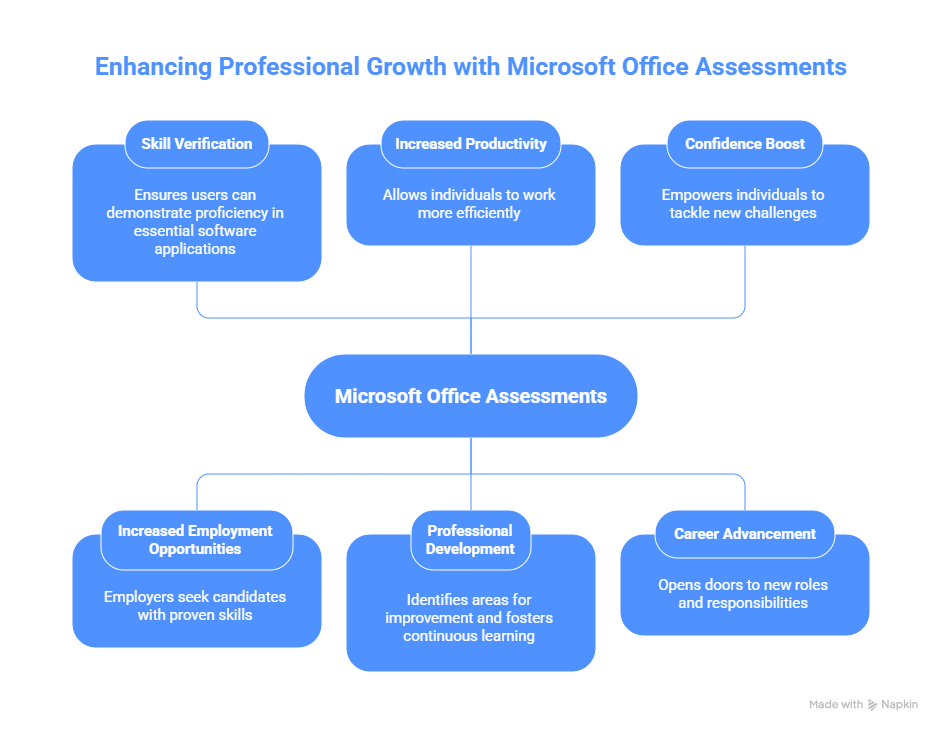
A person’s proficiency with the Microsoft Office suite of software, which includes Word, Excel, PowerPoint, and occasionally Access and Outlook, is assessed by Microsoft Office proficiency tests. The benefits of taking a Microsoft Office proficiency test include the following:
- Skill Verification: These tests offer a quantitative method for showcasing your abilities to prospective employers. It might be a powerful addition to your resume if you perform well.
- Employment Opportunities: Microsoft Office application skill is sometimes required for jobs, notably in Word, Excel, and PowerPoint. You may be more desirable as a candidate for these positions if you receive a high score on a proficiency test.
- Increased Productivity: You can find out where you need to improve by taking the test. You can work more productively and efficiently by raising your level of proficiency.
- Professional Development: An aspect of professional development can include studying for and taking the exam. You may learn new skills or improve existing ones, which can help you in your current job or future roles.
- Certification: Some Microsoft Office proficiency tests lead to certification, which is an official recognition of your skills. This can be a significant advantage in competitive job markets.
- Confidence Boost: Knowing that you are an expert with Microsoft Office might give you greater confidence and help you feel more at ease utilizing these products in a work environment.
- Career Advancement: Microsoft Office proficiency can lead to job progression prospects. It’s frequently a need for positions that entail producing reports, making presentations, and performing general administrative duties.
Why Do Employers Use Microsoft Office Proficiency Tests?
Employers use Microsoft Office proficiency tests as a means to assess a candidate’s ability to effectively use the software in a professional setting. Proficiency in Microsoft Office is essential in many job roles, such as administrative assistants, data analysts, and project managers.
By requiring candidates to take these tests, employers can ensure that they are hiring individuals who possess the necessary skills to perform their job responsibilities efficiently. Here are another few reasons why employers might use these tests:
1. Job Requirements:
Regular usage of Microsoft Office software is required for many occupational roles. Administrative assistants, for instance, might be required to draft documents in Word, financial analysts might use Excel for data analysis and reporting, and marketing experts might use PowerPoint for presentations.
2. Efficiency and Productivity:
Microsoft Office proficiency can increase productivity and efficiency. Understanding these software’s advanced features may speed up productivity, increase efficiency, and boost the overall quality of your job.
3. Standardization:
One of the most widely used productivity application suites is Microsoft Office. Due to the tendency of firms to standardize their processes around these technologies, competence in them is a prerequisite for effective collaboration and communication.
4. Reduced Training Costs:
Reducing the amount of time and money spent on training can be accomplished by hiring staff who are already adept in Microsoft Office. Faster onboarding and productivity ramp-up may result from this.
5. Benchmarking Skills:
Employers can create a baseline for abilities across the organization with the aid of proficiency exams. They can detect skill gaps, invest training funds wisely, and decide on promotions or role assignments based on this data.
6. Risk Mitigation:
Errors in documents, spreadsheets, or presentations can result in serious problems, such as improper data analysis or poor communication. These hazards can be reduced by hiring personnel with good Microsoft Office competencies.
How Skillrobo Evaluates Microsoft Skills
Skillrobo offers a comprehensive approach to evaluating Microsoft Office proficiency through automated, customizable, and role-based skill assessments. The platform uses a blend of practical tasks, scenario-based questions, and interactive exercises designed to replicate real workplace challenges. Instead of testing theoretical knowledge, Skillrobo measures how well a candidate can apply Microsoft Office features to complete actual job tasks. This approach provides a far more accurate representation of capability than simple multiple-choice quizzes.
For Microsoft Excel, Skillrobo’s assessments include data manipulation tasks, formula-based problem solving, chart creation, pivot table exercises, and conditional formatting scenarios. The test environment is configured to mimic real spreadsheet interfaces, enabling candidates to demonstrate their skills authentically. Skillrobo evaluates both accuracy and efficiency, giving employers insight into practical competence.
Microsoft Word assessments on Skillrobo involve formatting assignments, document structuring tasks, table creation, revision tracking, and template usage. The platform measures the candidate’s ability to follow complex formatting rules, organize content effectively, and produce professional-quality documents. This helps employers identify individuals who can maintain brand consistency and create polished business documentation.
For PowerPoint, Skillrobo tests include slide creation, layout optimization, visual enhancement, chart integration, and narrative structuring. The assessment goes beyond judging visual appeal and examines whether the candidate can communicate ideas clearly, design cohesive storylines, and present information logically.
Skillrobo’s Outlook assessments evaluate email prioritization, rules setup, scheduling efficiency, and inbox organization. These tasks reveal how well candidates can manage volume, maintain clarity in communication, and optimize their daily workflow.
All Skillrobo assessments come with anti-cheating features including browser lockdown, webcam monitoring, and secure testing environments to ensure test integrity. Detailed analytics provide skill breakdowns, proficiency scores, competency benchmarks, and insights into areas requiring improvement. Companies can customize assessment difficulty levels, question types, and role-specific tasks to align the evaluation with job requirements. This makes Skillrobo a powerful tool for hiring managers, L&D teams, and HR professionals aiming to assess Microsoft Office skills accurately, fairly, and at scale.
Conclusion
Proficiency in Microsoft Office is a sought-after skill in today’s job market. Employers rely on Microsoft Office proficiency tests to evaluate candidates’ abilities and ensure they have the necessary skills to perform their job responsibilities efficiently.
By understanding the different types of Microsoft Office proficiency tests, individuals can adequately prepare and showcase their expertise in Word, Excel, PowerPoint, and Outlook. With the plethora of online resources available, individuals have the means to enhance their skills and increase their chances of success in Microsoft Office proficiency tests.
Skillrobo’s pre-employment assessment platform has different types of skill tests which evaluate a candidate’s ability. This platform also contains a Microsoft Office proficiency test to assess the candidate’s knowledge of Microsoft Office applications. This makes it easier for the hiring team to find candidates who are proficient in the Microsoft Office Suite for the desired position.
Supercharge your selection process with Skillrobo’s pre-employment assessment platform. Find the perfect candidate for your team today! Sign Up now!
FAQs
Why are Microsoft Office skills important in modern workplaces?
Microsoft Office skills are essential because they support core workplace tasks such as data analysis, documentation, communication, reporting, and presentation creation. Whether in administration, finance, HR, sales, or operations, employees use Excel, Word, PowerPoint, and Outlook daily. Strong proficiency ensures efficiency, accuracy, and professional output, making these skills critical for productivity and organizational performance.
What Microsoft Office skills do employers test most often?
Employers typically test Excel skills such as formulas, pivot tables, data analysis, and formatting. In Word, they evaluate document structure, styles, tables, and layout management. PowerPoint tests focus on slide design, visual communication, and storytelling. Outlook assessments measure email management, scheduling, and organizational skills. These areas reflect the most common and valuable tasks employees perform in office environments.
How do online assessments measure Microsoft Office proficiency?
Online assessments evaluate Microsoft Office proficiency using task-based modules, interactive simulations, multiple-choice questions, and scenario-driven assignments. These tools measure both speed and accuracy, offering insights into real-world capabilities rather than theoretical knowledge. Advanced platforms also include video-based tasks, real-time scoring, and automated skill analytics for deeper evaluation.
Can Microsoft Office assessments be customized for different job roles?
Yes, Microsoft Office assessments can be customized to match job-specific tasks. For example, financial analysts may require advanced Excel tests, while administrative roles may focus more on Outlook and Word. Customization ensures the assessment reflects the actual skills needed for the role, making hiring decisions more accurate and aligned with performance expectations.
How does Skillrobo help in assessing Microsoft Office skills accurately?
Skillrobo uses real-world tasks, simulations, and role-based exercises to evaluate Microsoft Office proficiency comprehensively. Its automated scoring, customizable test formats, anti-cheating tools, and detailed performance analytics provide employers with reliable insights into candidate skill levels. Skillrobo’s assessments measure practical competency rather than memorized knowledge, ensuring organizations identify the right talent with genuine software proficiency.